This post is part of my series on Android live wallpapers.
Visit my other blog posts where I cover creating live wallpapers in:
- Android studio: https://dbeef.lol/2019/09/29/creating-live-wallpaper-in-android-studio/
- LibGDX: https://dbeef.lol/2019/09/29/creating-live-wallpaper-in-libgdx/
Templates for all three technologies are on my repository:
https://github.com/dbeef/CreatingAndroidLiveWallpapers
After covering live wallpapers in Android Studio (which I recommend to see, for the sake of having reference to the concepts I will use in this post) I had some understanding of what I want to do in Unity, which was:
- Overriding default AndroidManifest.xml that Unity creates
- Add one custom Java class, that I will reference from overriden manifest
- Add another resource xml file
Additionally, as Unity creates its own Activity when exporting as Android Project, I wanted to reference that activity from my Service declared in Java class, so I could render Unity scene when running as wallpaper.
So I created a clean new Unity project and set-up building to Android.
After quick Googling it looked adding my custom Android-specific code to Unity project will be essentially… Creating Assets/Plugins/Android directory (from root of the project) and copying my files there.
When listing files from that directory:
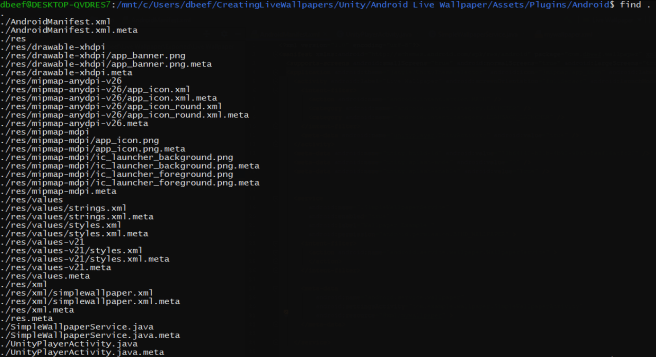
So what I did was copying res, *.java files from of my Android Studio project, omitting SimpleWallpaperActivity.java, as Unity provides its own Activity.
I also omitted AndroidManifest.xml file – as the one provided by Unity (when exporting as Android project) was a bit bloated and it would be more efficient to just copy very specific content that I needed into Unity’s – I copied whole service tag from my Android Studio project and uses-feature tag.
What was still needed at this point is to reference Unity’s activity to render the scene.
As normally I don’t use Unity I gave up after some time and found out existing wallpaper service that utilizes Unity’s activity by PavelDoGreat:
https://github.com/PavelDoGreat/Unity-Android-Live-Wallpaper/blob/master/WallpaperActivity.java
Keeping package name consistent within Unity and overriden classes that I supplied was essential, otherwise some symbols can be undefined.
You can set package name in Unity’s:
Edit -> Project Settings -> Player.
What then? Just hit Unity’s Build and run.
 ./0xdbeef > blog.txt