Soldat – Networking in Picture I

Intro

Ever since reading Multiplayer Game Programming by Glazer & Madhav I was toying with an idea of taking some classic multiplayer game, simulating a set of typical network problems and recording how/if the game mitigates them, possibly witnessing tricks as described by the book. At the forefront of my experiment – my childhood’s favorite – Soldat.

Setup

  • Using 2 separate computers over LAN
  • Hosting Soldat server on the same computer as the reference Soldat client
  • Using Clumsy to simulate network issues on computer B
  • Every tested network issue, be it lag or packet dropping, has been applied on both inbound and outbound packets to/from computer B
  • For exact parameters (lag delay in ms, packet drop chance, etc.) see the screenshot below:

Latency hiding tricks

Client side move prediction and dead reckoning

in/out lag, 300ms

The client, instead of waiting for the server to send back updated position after pressing A (move left) key, implements move prediction. Player feels an instant feedback after his key press, even though his input is effectively sent only after a 300 ms delay.

Take two things out of this recording: the discrepancy between both views – from the reference client’s perspective, the other player is still standing while the other thinks he’s moving – and instantness of the character movement from the lagging client perspective.

in/out lag, 300ms

That being said, the server always has the final word, so called authority. Recording above depicts an attempt to pick up a “berserk mode” crate by both clients standing within the same distance starting at the same time. Notice how the lagging client does not get the crate, even though from his perspective he was the one to pick up the crate first.
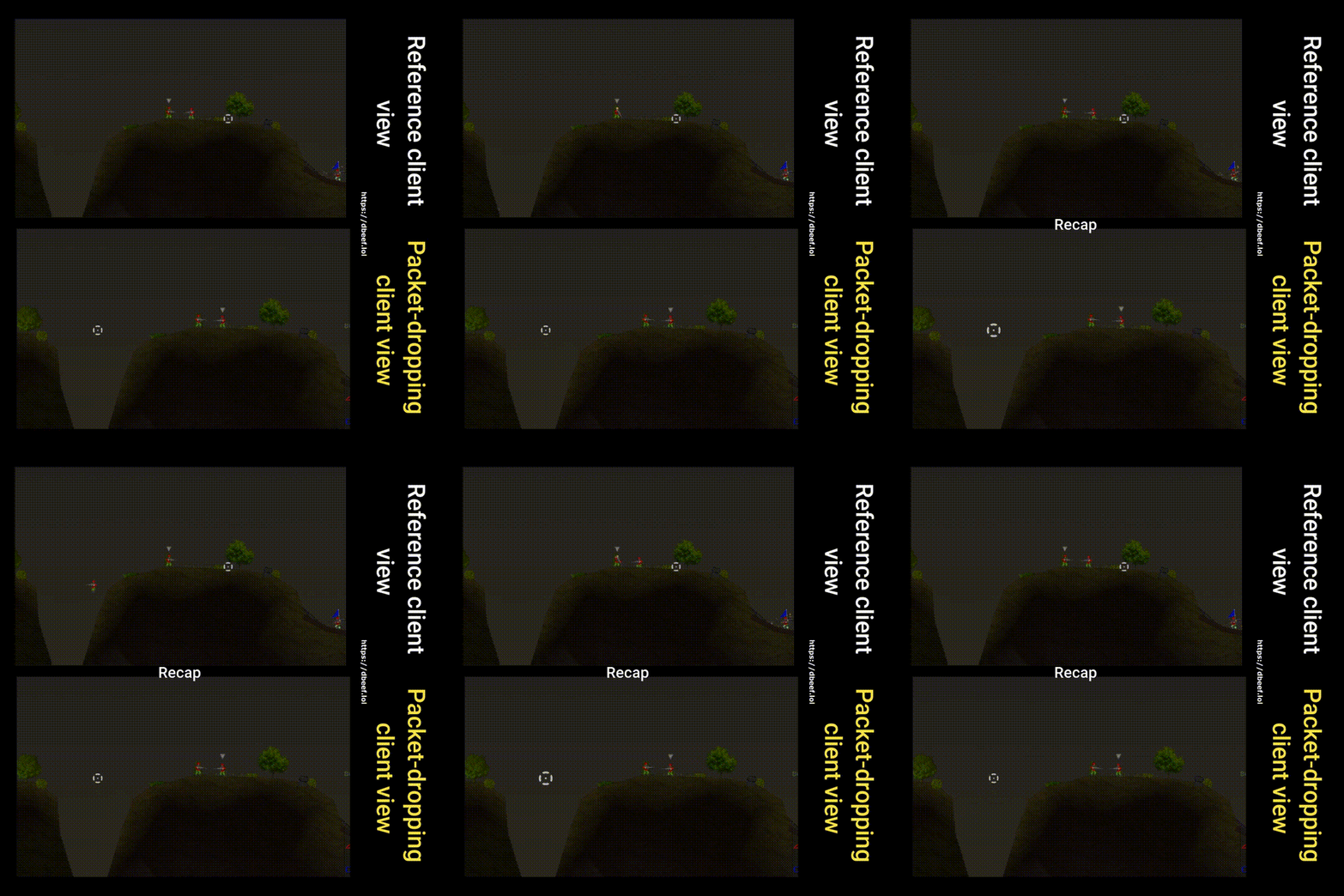
in/out packet drop, 50% chance

Also, prediction is just prediction – if packets are dropped, and in fast-paced games there’s little reason to resend them, as they will be out of date the moment you realise delivery failed – then the other party keeps updating their simulation based on the last received information (so called dead reckoning). Here, discrepancy appears as the client dropped a packet informing the server that he stopped pressing the key. Once the packet-dropping client presses a jump button, the server realises his mistake and teleports the client where he should be (at least according to the server, because remember, server has the authority).

Minor detail: notice how the idle animation is running only on the reference client. Could be a matter of a dropped packet, but it hints another lesson: save the bandwidth, don’t waste packets for sending information that is irrelevant for the gameplay. You will notice that particle effects differ on both clients as well.
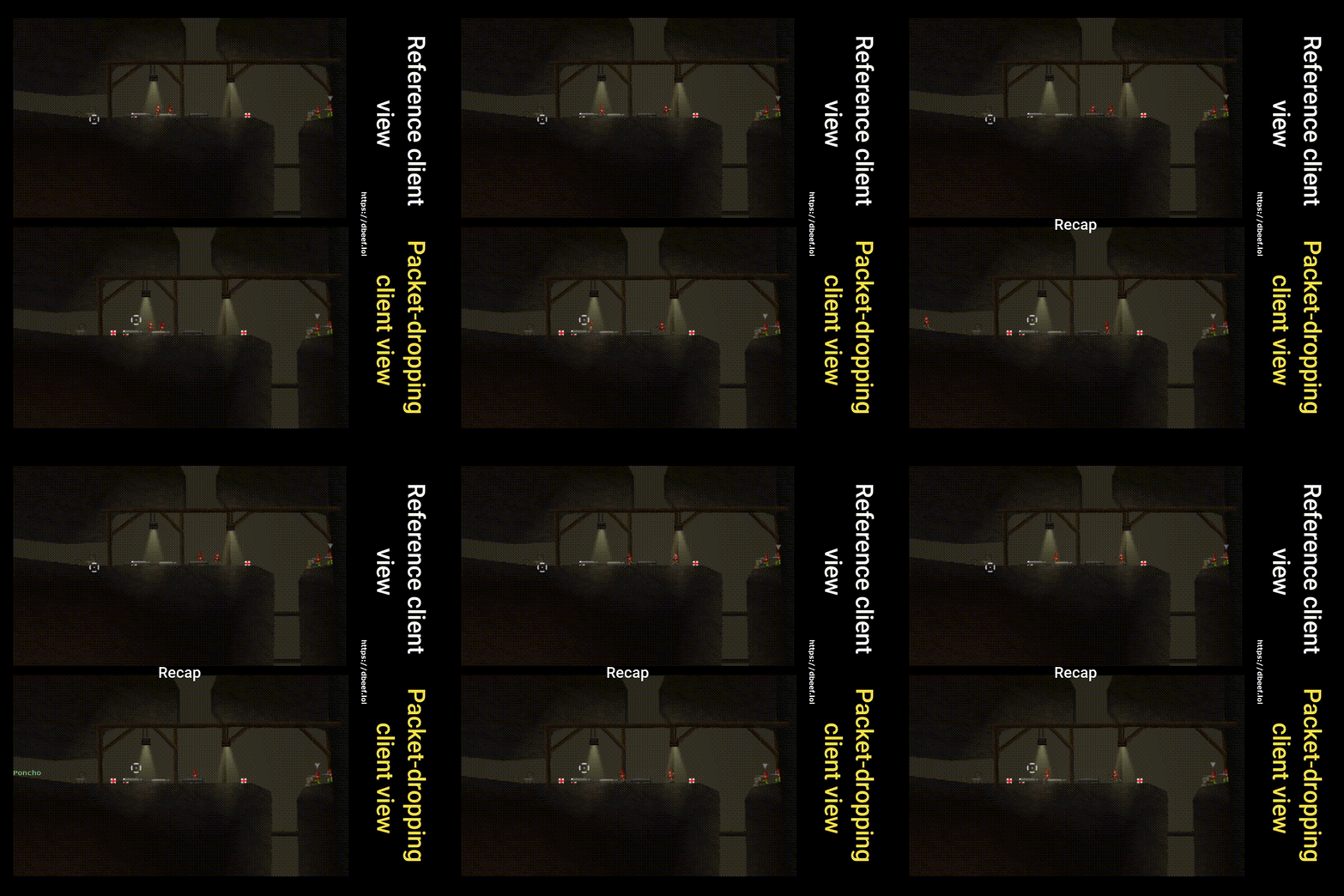
in/out packet drop, 50% chance

Since packets are dropped for both in/out, the packet-dropping client also has to resolve client-server discrepancies that arise. The information he gets on other players’ movement is less frequent in this scenario. Notice how it teleports players to their true (server) position once a packet finally gets through. Marcinkowski makes a point on his blog about how this process should be smoothened, so it’s less visible for the player when it happens. One possible idea is to interpolate the discrepancy-position-fix over a few frames to make it less teleport-like.

in/out packet throttling, 30% chance, 500ms timeframe

Similarly to packet drop, throttling packets makes the same effect. Per Clumsy documentation:

Throttle: block traffic for a given time frame, then send them in a single batch.

…which in turn causes discrepancies for the client to resolve – because remember, only the most recent packet is of value, and if we receive a single batch of packets from the past 500ms, effectively it’s the same experience as packet dropping, because majority of this data can be dropped (they are stale packets).

Server-side rewind

in/out lag, 300ms

One of the tricks Glazer & Madhav describe is so called server-side rewind, a lag-compensation technique. It’s about making hit detection fair, despite differences in client latency. The server determines whether a shot fired by a lagging-client should hit based on what he saw at the time they fired, not what the server sees now. I did not record this exact scenario per-se, but still witnessed something unusual – notice how the server decided to spawn a projectile after the lagging-player died (reference client view). I’m sure some kind of a lag-compensation technique was employed here.

Handling out-of-order packets

in/out out-of-order, 60% chance

Look closely. Do you see anything special? Me neither, that’s because Soldat handles out of order packets well. To quote Marcinkowski’s own words:

Typically you just number the packets and discard any packets out of order. This is where packet loss really occurs, when you lose them yourself because they came out of order or late. So the time spent on making LD work with packet loss was not wasted. I spent an entire month before releasing the alpha trying every solution under the sun to make the multiplayer smooth in Link-Dead and the results are very good.

Securing against malicious activity

Flooding
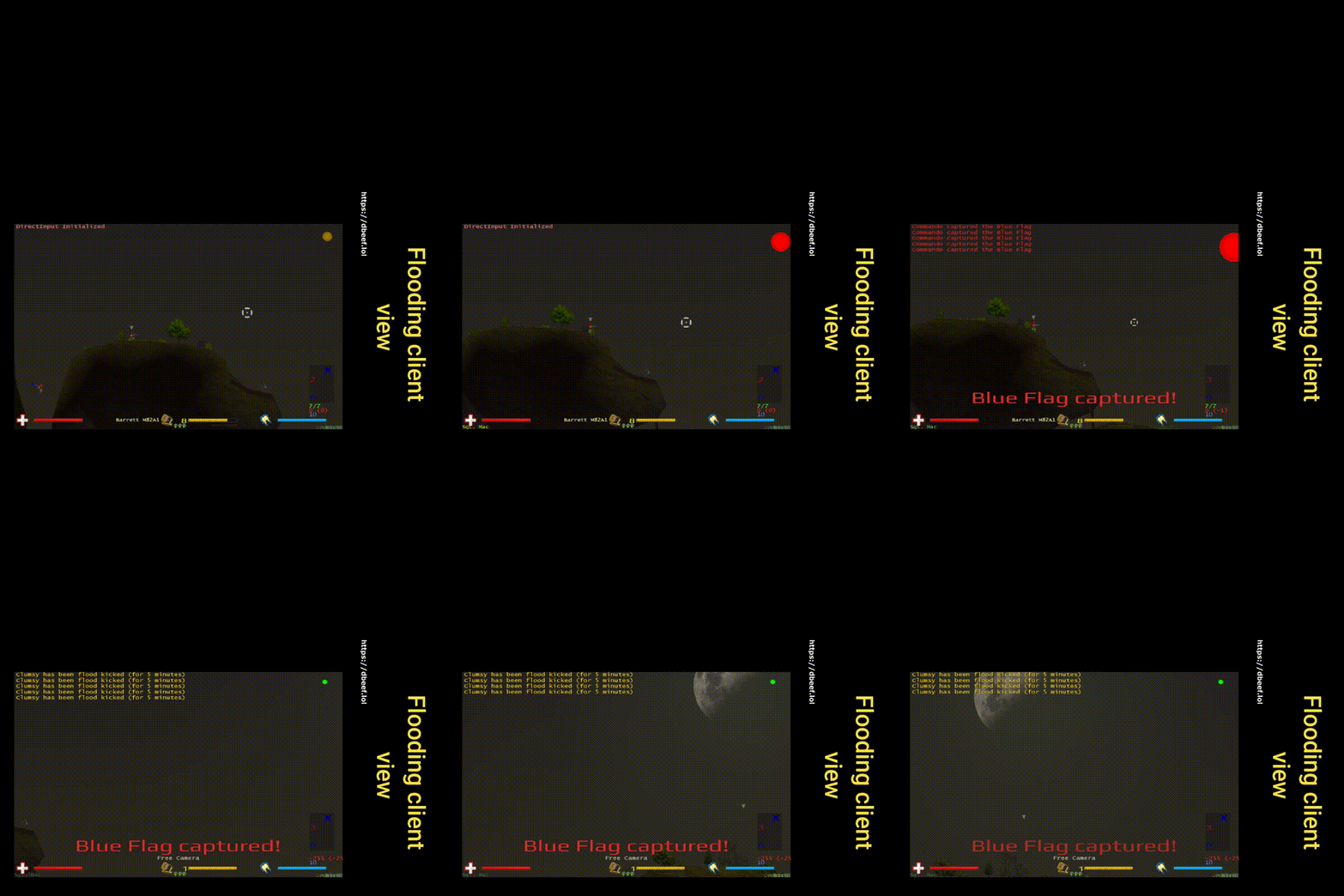
in/out duplicate, count of 20, 100% chance

For the context: I increased both the count and chance iteratively. The server would tolerate a lot and only an extreme value of duplicating every packet 20 times would cause the server to ban the duplicating-client. Why does the server not ban after the first duplicated packet? One idea is – because it can happen even without malicious intentions. Given some kind of a packet resend mechanism is implemented and the client is not acknowledged in time that the packet has been received (acknowledgment-packet could be dropped, lagged, etc.), it could send the packet again. Just speculating, much simpler and more realistic would be that there’s a fixed rate of maximum packets per client per unit of time – which would be more suiting for a fast paced game than resending.

As a funny side note, notice how the chat messages are duplicated as well. This is likely because both inbound and outbound packets are set to be duplicated.

Summary

Simply – kudos to MM for creating lots of good memories and a game that is hardened against even a very hostile network environment.

This experiment pictures how two distinctive players can have two, very different perceptions of what’s happening in the game and it’s a compromise we all agree for the game to be smooth and fun. With every client having his own version of the simulation, the only source of truth is the authoritative server, and every client is just doing its best to align his own simulation with it.

Links

Kapitan Bomba

Jakiś czas temu, w ramach prezentu, opracowałem mały biurkowy gadżet dla fana Kapitana Bomby. W zamyśle, wciśnięcie go powoduje odegranie losowego cytatu.

Wykonanie można podzielić na 5 części:

1. Projekt 3D (dałem z siebie całe 30%)

Za bazę posłużył mi panic button znaleziony na Thingverse.
Ściąłem dolną część (za wysoka), dodałem miejsce na port micro USB, do tego ozdobne wcięcie na element z innego niż bazowy filamentu a także dwie ozdobne płytki do przyklejenia na przycisk i poniżej. Sam przycisk, który jest półokrągły, ściąłem u szczytu. Jako program CAD użyłem Shapr3D.

2. Druk 3D

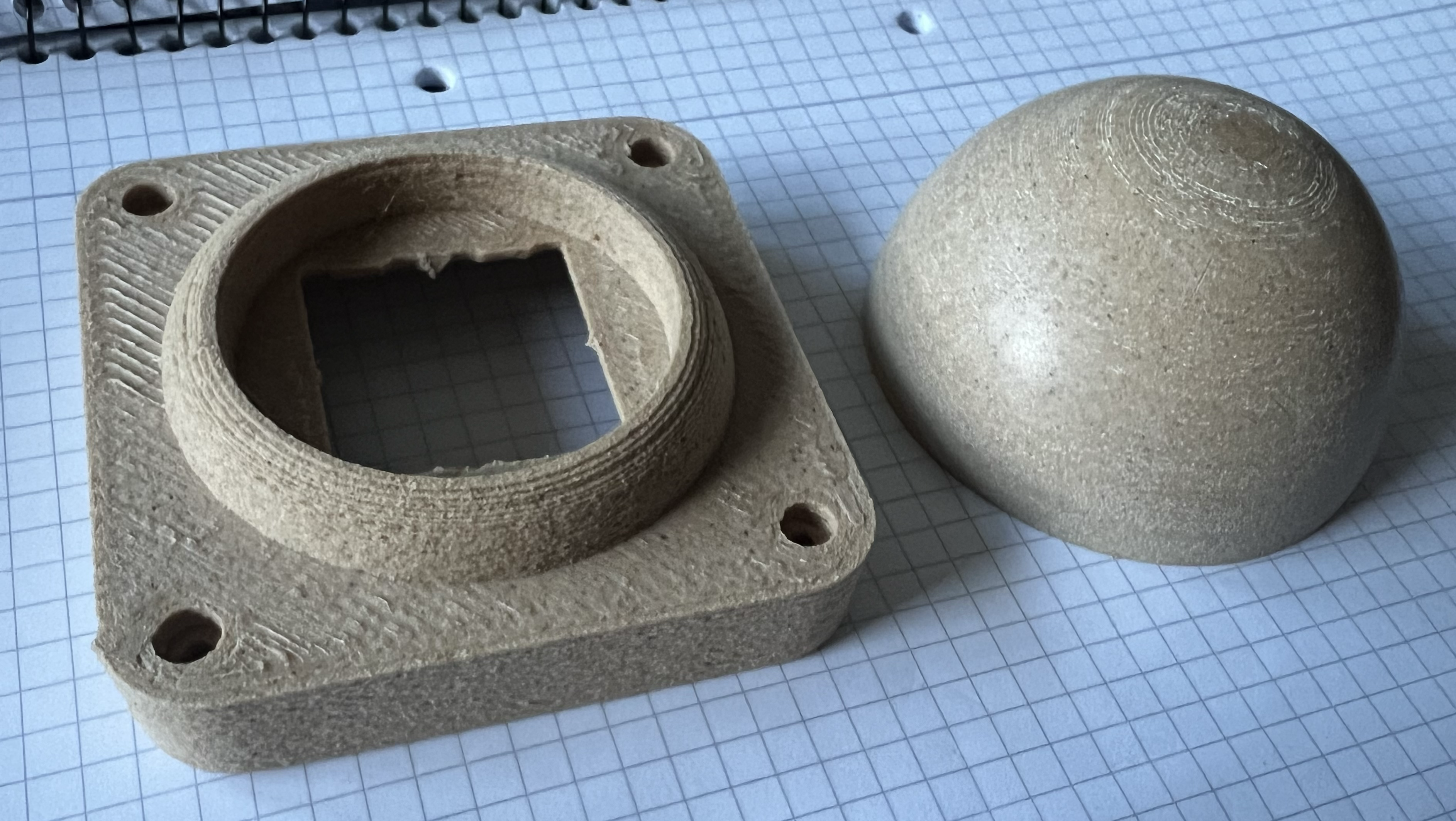
Była to okazja do przetestowania nowego drewnianego filamentu. W praktyce okazał się on zbyt kruchy, wymagał zmiany dyszy na większą (0.5 mm to absolutne minimum, aby się nie zapychała), a estetycznie zostawiał wiele do życzenia, nawet po starannym piaskowaniu (efekt po prawej).


Efekt widoczny na górze przycisku (pojawiające się wyraźnie linie im bliżej do czubka) skłonił mnie również do ścięcia przycisku od góry. Ten efekt jest niezależny od przekroju dyszy czy filamentu, na drukarce filamentowej tak już będzie drukując sferę.

Teoretycznie, można jeszcze użyć jakiegoś neutralnego wypełniacza, ale po co?

Ostatecznie zdecydowałem się na czarny filament jako bazę z miedzianym filamentem do detali (Rosa3D Copper).

3. Elektronika (Czujesz ten zapach? Tak pachnie 100 złoty)

Części jak niżej:

  • 4x przełączniki MX Cherry Red (bo akurat miałem)
  • 1x Raspberry Pi Pico
  • 1x DFPlayer mini MP3
  • 2x Adafruit 4227 Mini Speaker 1W 8 Ohm
  • 1x Goodram M1AA microSD 16GB
  • 1x LED 5mm
  • 1x rezystor 57 Ohm
  • 4x Nóżki samoprzylepne 12x12mm

Do tego rurki termokurczliwe i gwinty M2.
Wszystko poza przełącznikami można znaleźć na Botlandzie.

Przyjąłem założenie, że gadżet będzie zasilany po kablu USB (w końcu gadżet biurkowy, zawsze znajdzie się miejsce do podłączenia), stąd brak aku czy miejsca na baterie.

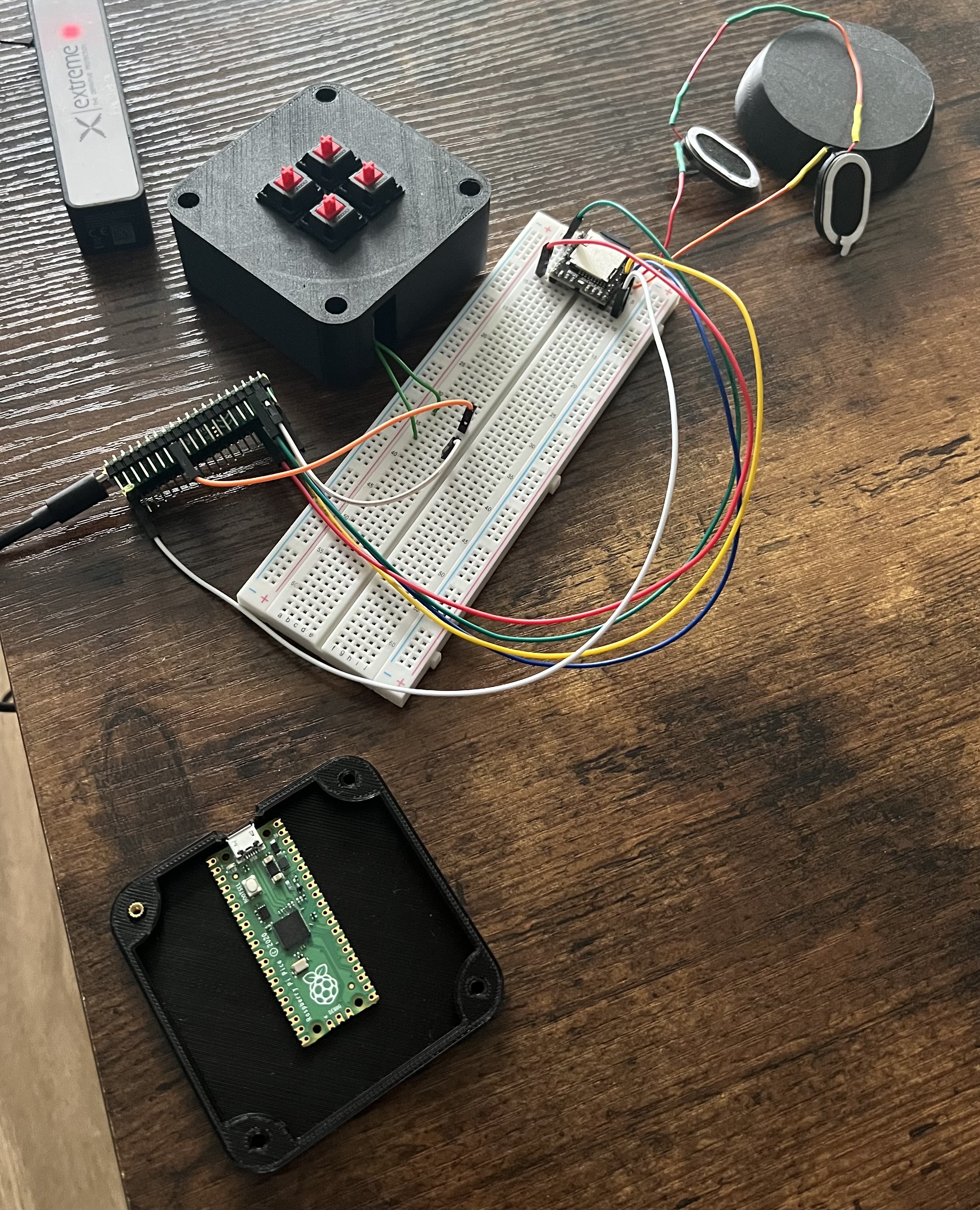
Całość na płytce prototypowej:


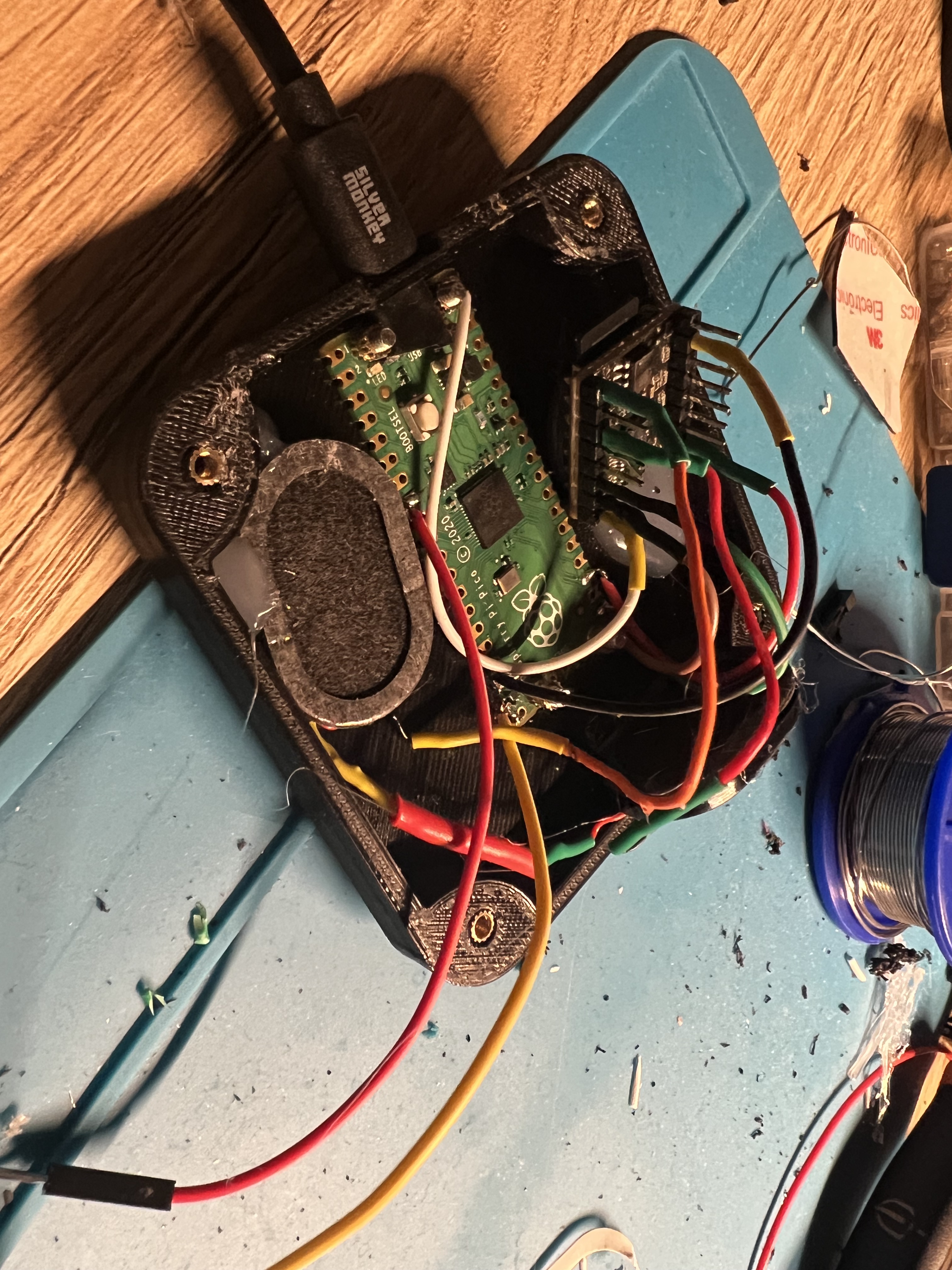
I podczas składania (schludnie, choć nasrane):


4. Zebranie .mp3

Planowałem siąść do oglądania Kapitana Bomby i w miarę oglądania wycinać najlepsze cytaty, szybko jednak mnie to znużyło, zastanowiłem się więc – przecież muszą być już jakieś gotowe soundboardy. Znalazłem kilka webowych, ale to było za mało, szukałem dalej i znalazłem dwa soundboardy na Androida. 

Ponieważ pliki .apk to zwykłe archiwa .zip, a assety wewnątrz okazały się nieobfuskowane, szybko zdobyłem odpowiednie .mp3 nie męcząc się zbytnio:


Sam dźwięk nie był znormalizowany pomiędzy poszczególnymi plikami, ale zasadniczo dało się z tym już coś zrobić. Poszczególne pliki nazwałem wedle szablonu numer_pliku + .mp3 dla łatwego odtwarzania losowego i wrzuciłem na kartę microSD.

5. Soft (po co testować, skoro domyślasz się, że powinno działać?)

Do części softowej skorzystałem z Micropythona. Tak, mógłbym użyć C i cross-compilować cały projekt, ale nie muszę nikomu udowadniać, że umiem 🙂

Całość była niesamowicie szybka i produktywna; wystarczy przerzucić runtime Micropythona na płytkę i stworzyć jako punkt wejścia plik main.py.

Do przerzucania plików i korzystania z repl do developmentu:
https://github.com/dhylands/rshell

Tu nie ma za wiele do powiedzenia; DFPlayer robi większość roboty, sam skrypt jedynie:

  • sprawdza stan przycisku
  • zapala/gasi frontowy LED, gdy wciśnie się przycisk
  • inicjalizuje moduł DFPlayer (komunikacja po UART)
  • podaje do modułu DFPlayer komendę start/stop kolejnego losowego cytatu, gdy wciśnie się przycisk

Wnioski na przyszłość:

  • W projekcie nie uwzględniłem grilla, przez co sam dźwięk był o wiele cichszy już po umiejscowieniu głośników wewnątrz obudowy. Próbowałem to naprawić wiercąc odpowiednie otwory – to był zły pomysł! Miejsce tej próby zakryłem później tabliczką Made In Galaktyka Kurwix. Swoją drogą, model .stl z tekstu wygenerowałem na tej stronie.
  • Ze względu na porowatą strukturę wydruku, do klejenia dobrze sprawdził się Poxipol. Wewnątrz obudowy użyłem pistoletu na klej (myślałem o przewidzeniu w modelu miejsc na wciśnięcie odpowiednich części, ale całość miała jednorazowy charakter a ewentualne poprawki byłyby czasochłonne)
  • Gwinty M2 które umieściłem w obudowie, aby móc ją rozkręcać zamiast permanentnie skleić nie sprawdziły się – wtapianie ich za pomocą grotu lutownicy o mało co nie zepsuło całej obudowy.
  • Na sam start urządzenia odgrywam powitalny cytat – problem jest taki, że urządzenie potrafi spontanicznie się uruchomić, gdy jest podłączone do uśpionego komputera (jakieś optymalizacje zasilania po USB?). Retrospektywnie – raczej nie dodawałbym tego ficzeru.

On Small Improvements

My recent command-line upgrade – 3 IDE-like keybindings.

  1. Ctrl+n -> Search for a file containing given string – in filename
  2. Ctrl+f -> Search for a file containing given string – in its contents
  3. Ctrl+o -> Open file explorer in current directory

Fun fact, I added a distro-specific branching for Ctrl+o. It detects whether it’s a WSL Ubuntu, if so, it makes use of the fact that you can call any arbitrary Windows executable from WSL and calls explorer.exe instead of Ubuntu’s nautilus.

What’s important is making the command invocation “silent”, that is – not editing the current buffer in any way involved when pressed. Otherwise it’s too distracting.

On its own, not a big thing, but all of the 1% changes do accumulate!

You can find my dotfiles here.

Specialists and Generalists

A jack of all trades… but master of none.

Says the popular notion. It’s about how you cannot be good in everything, and, by trying, you won’t be good at anything. People associate focus in one domain as something positive. After all, a drive towards one single thing is a sign of determination, motivation, keeping interest and passion. Jumping from one topic to another could be a sign of impulsiveness, indecision, and it does not bring trust and safety.

Some time ago I’ve read a book called Range. It covers the topic of specialists and generalists. People who excel in a single domain, most of the time even a subdomain of some domain, AND, on the other side of the spectrum, people with so-called interdisciplinary knowledge or experience, spanning maybe not so deeply as the specialists, but across multiple domains.

Turns out, the results of its investigation are contrary to the notion in question:
Being apt in multiple domains is an advantage.

It’s of particular interest to me as it confirms an observation I made in computer science, that is – multiple fields of interest make the best programmers.

Consider C++ software development. Put a magnifying glass, what do you see? There’s design patterns, standard library knowledge, build systems, tools, libraries, platform-specific (Linux, Windows, Mac) knowledge, especially when it comes to building artifacts and I didn’t even mention the core language knowledge – which is a significant yet only one of many puzzles in C++ development.

Each of the little things under the magnifying glass can be applied to make a game engine, make a stock-exchange program where every millisecond counts, make not less demanding software for embedded devices with a lot of constraints, make an operating system, and so on. This knowledge is 100% transferable between the projects, even though the project may be diametrically different in high-level terms (compare software for controlling medical equipment VS a video game). Some of it is even transferable between programming languages – from the list above, an easy pick are design patterns and libraries (i.e a native library with bindings to multiple languages, the SDL’s bindings exist for Rust, Python, Go, and probably a lot more).

Consider another example, moderately astray software development – cybersecurity. It crosses paths with Linux administration (or at least proficiency), web development, programming as a lot of times you want to automatise something or make a custom tool (here comes Bash and Python scripting). There’s a little bit of forensics, i.e Wireshark. There are protocols, file types, reverse engineering! A very, very big bubble – and yet it still overlaps the aforementioned bubble of C++ programming – when it comes to security mitigations like canary values (-fstack-protector in gcc ;)), position-independent-code, or security vulnerabilities like stack overflow (i.e C function gets not checking for input length) or format string attacks (using printf/scanf).

Now, my point is – computer science is so interconnected, that you benefit tenfolds when you mix backgrounds. Less and less is a black-box, like a map that continuously gets charted, removing empty spots. Ideas from one place are likely to be useful elsewhere, or at least provide an inspiration – no experience is wasted. Heck, everything is interconnected. Me writing this post is an exercise in presenting information. It’s an exercise in English. Is it computer science? No. Will it contribute to the overall picture when making software? Yes.

Now you may understand the beef I have with leetcode-based interviews. Throwing away all of the aspects of software-development and screening your candidate based on a very narrow part of their job – is that really the best one can come up when recruiting? Google the phrase “leetcode considered harmful” for more insights on this, I won’t expand on the topic because that’s not what I want you to take from this post.

What I want to be taken from this post is:

  • Pursue novelty – makes your mind fresh
  • Be a renaissance man – for fun and profit
  • There’s space for both specialists and generalists (though the latter seem to get a bad press), both equally important

I’d like to finish with a massive excerpt from the book Range – a big one, but it’s distilled essence of its 333 pages:

„There are domains beyond chess in which massive amounts of narrow practice make for grandmaster-like intuition. Like golfers, surgeons improve with repetition of the same procedure. Accountants and bridge and poker players develop accurate intuition through repetitive experience. Kahneman pointed to those domains’ “robust statistical regularities.” But when the rules are altered just slightly, it makes experts appear to have traded flexibility for narrow skill. In research in the game of bridge where the order of play was altered, experts had a more difficult time adapting to new rules than did nonexperts. When experienced accountants were asked in a study to use a new tax law for deductions that replaced a previous one, they did worse than novices. Erik Dane, a Rice University professor who studies organizational behavior, calls this phenomenon “cognitive entrenchment.” His suggestions for avoiding it are about the polar opposite of the strict version of the ten-thousand-hours school of thought: vary challenges within a domain drastically, and, as a fellow researcher put it, insist on “having one foot outside your world.” Scientists and members of the general public are about equally likely to have artistic hobbies, but scientists inducted into the highest national academies are much more likely to have avocations outside of their vocation. And those who have won the Nobel Prize are more likely still. Compared to other scientists, Nobel laureates are at least twenty-two times more likely to partake as an amateur actor, dancer, magician, or other type of performer. Nationally recognized scientists are much more likely than other scientists to be musicians, sculptors, painters, printmakers, woodworkers, mechanics, electronics tinkerers, glassblowers, poets, or writers, of both fiction and nonfiction. And, again, Nobel laureates are far more likely still. The most successful experts also belong to the wider world. “To him who observes them from afar,” said Spanish Nobel laureate Santiago Ramón y Cajal, the father of modern neuroscience, “it appears as though they are scattering and dissipating their energies, while in reality they are channeling and strengthening them.” [highlight mine – Daniel] The main conclusion of work that took years of studying scientists and engineers, all of whom were regarded by peers as true technical experts, was that those who did not make a creative contribution to their field lacked aesthetic interests outside their narrow area. As psychologist and prominent creativity researcher Dean Keith Simonton observed, “rather than obsessively focus[ing] on a narrow topic,” creative achievers tend to have broad interests. “This breadth often supports insights that cannot be attributed to domain-specific expertise alone.”
Those findings are reminiscent of a speech Steve Jobs gave, in which he famously recounted the importance of a calligraphy class to his design aesthetics. “When we were designing the first Macintosh computer, it all came back to me,” he said. “If I had never dropped in on that single course in college, the Mac would have never had multiple typefaces or proportionally spaced fonts.”

Cheers,
Daniel

Short story on rendering tiles

Once upon a time in rendering API’s realm

Here I am presenting what is my experiences when implementing one of the base functionalities in Spelunky-PSP which I currently develop – tile rendering.
Featured in narration, as it makes even that dull essay a little bit joyful.

Back to the basics

Say, you want to draw a single, textured tile in terms of OpenGL pipeline. Having done usual boilerplate, by which I mean creating OpenGL context,  loading texture from the filesystem, then uploading to the GPU, obtaining texture ID, binding it to a desired texture slot, writing a dummy shader, compiling, linking vertex and fragment programs, and binding the final product, you finally end up writing the rendering part.

What you need is a frame on which you will stick your texture – so you declare a mesh.
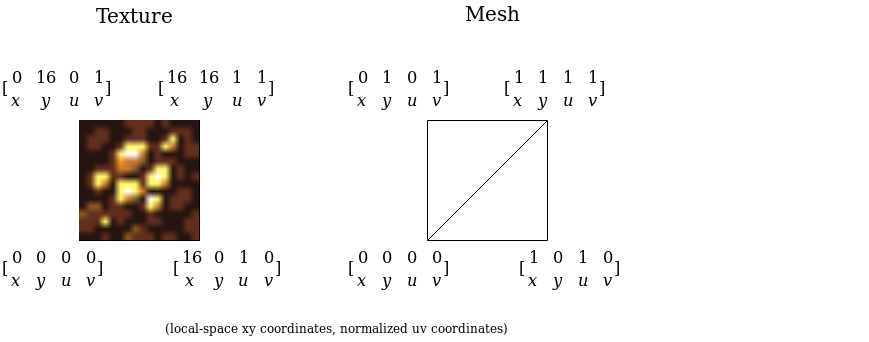
As the tile is a quad, two triangles are pushed to the collection you just created, each of them of three vertices, every described by xy and uv.
Situation is presented by the following image:

Basic_Texture_Draw(4)

You upload the mesh to the GPU, and eventually issue a render call.
Satisfied with results, you go straight for a full tile renderer.
That means, a draw call for a 2D list of 32×24 tiles will be dispatched every frame (your total map size is much bigger, but I assume that you already thought of some optimization and batch only tiles that are in camera viewport). Most of the tiles differ in terms of attached texture, meaning you will have to issue a lot of OpenGL texture binding calls, but you have heard a lot how premature optimization hurts development, so you dismiss the problem.

After briefly writing your proof of concept, you finally run it on the mobile platform you are targeting. Results are puzzling…

It works, but the FPS counter is below expected 60, and that’s not even a full game yet.
One idea comes – how about sorting the batch of tiles to render by the texture attachment ID? That will surely lessen individual texture binding calls.

Again, you apply performance fix to the renderer, and run a profiler.
This time, rendering the very exact scene takes 14 milliseconds. That’s more that 60 FPS!
But what with rendering other entities? Player, mobs, monsters, items, particles?
Desperate for gaining some time buffer for future additions you want to improve your tile renderer.

Optimizing render call

What needs to be achieved is to minimize quantity of texture binding calls, as each of them is considered time-costly.
Sorting did minimize it, but there’s even more effective method: texture atlases.
If you have all your tiles merged into a single texture, you don’t have to issue any individual texture binding calls ever, except one binding call for the tilesheet.

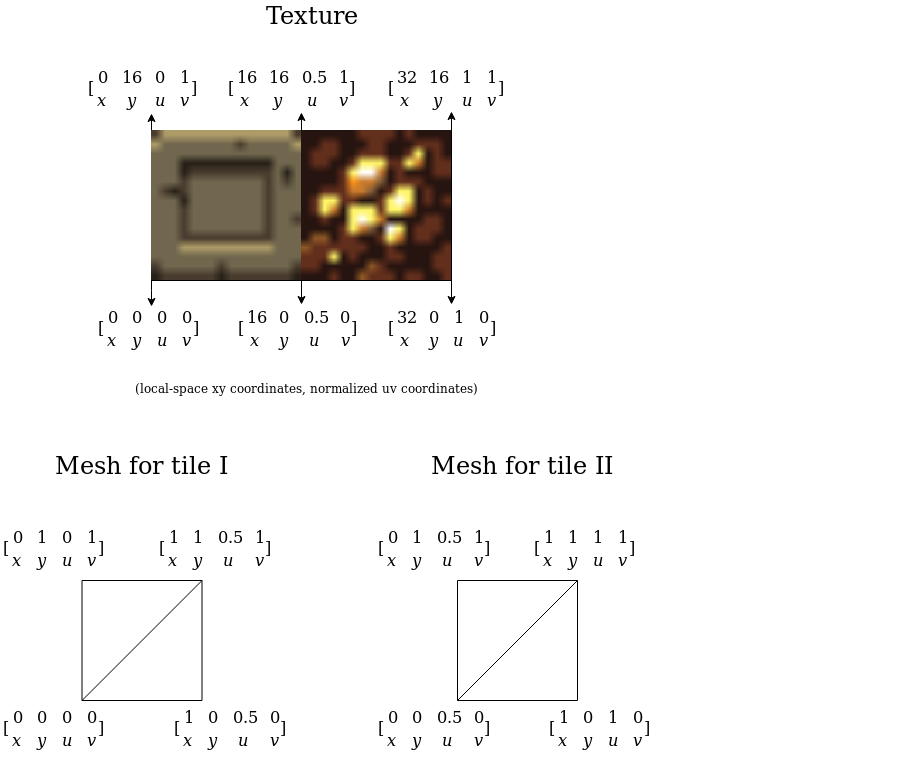
So you end up sticking two tiles together in the image editor of yours, which can be illustrated by the diagram below:

TextureAtlasRender

From this example you see the rule for calculating normalized UV for specific tiles.
Before it can be scaled to rendering more than two tiles, few things must be noted:

  • Merging textures together using an image editor is unpleasant and time-costly
  • Manual calculating UV’s for each tile is error-prone and time-costly

Imagine storing an animation for a game character in a manually done spritesheet. Suddenly, adding or removing one frame is a massive enterprise, as it involves re-calculating uv’s by hand and cutting the image.

Surely there must be a piece of software that would automatize the process?

Narrator goes off-topic

There’s a lot of free programs that offer such functionality, and as far as my research goes, atlasc is one that has traits I prefer most.

Written in C, it can be built from source (with CMake as a build system), no external dependencies needed, multiplatform, but what’s most important:

  • It’s command-line.
  • Output image dimensions can be configured. Important on platforms where GPU constraints maximum width/height of uploaded textures, i.e PSP supports up to 512×512 pixels.
  • Outputs image metadata in JSON format. Containing individual image name, width, height, x, y (not normalized) and even mesh with complete index buffer.
  • Padding and border for each sprite can be configured in terms of pixels.
  • Scale of each sprite in output image can be configured

Back on the track

Having all this information, you go and happily merge all your tiles using mentioned atlasc, calling:

atlasc *.png -o level_tiles -B 0 -P 0 -m -W 128 -H 128 -m -2

You modify the game, so it would deserialize outputted JSON in runtime, loading UV’s for each tile, then incorporate them to created mesh.

Your tilesheet looks like this:

level_tiles

Finally, you compile the program, having so far only one texture binding call in its rendering loop, and run it.

As your heartbeat goes up when you see render call time being even smaller than after sorting tiles, while moving camera you discover some problem:

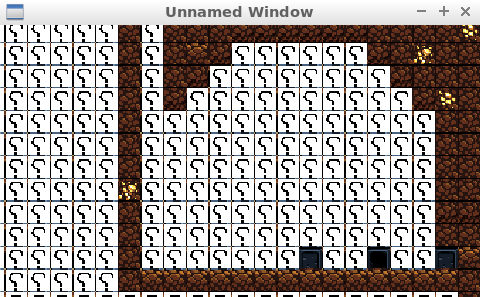
pixel_bleeding_nearest

Where did those dark seams between tiles come from?!
There is supposed to be no frames between the question-mark tiles.

Here comes the problem

Initially, you search for source of the problem in texture-loading parts of the code, thinking that texture filtering may cause such artifacts.
As your assets are of pixel-art style, you choose nearest-neighbour filtering, instead of linear one, which interpolates between neighbouring texels leading to blurring those sharp, pixel-art edges.

On the left – nearest neighbour filtering, right – linear filtering. Illustration taken from learnopengl.com which I fully recommend.

That gives a hint – as atlasc outputs UV in pixels, and during serialization they are normalized so to pass them to the mesh, probably normalized value goes out of scope of specified tile, bleeding parts of tile that is neighbouring it. Such events are called pixel bleeding.

In case of this question-mark tile, tile that is neighbouring it is a ladder-tile, which would explain bleeding this dark frame (scroll up to the tilesheet and see it!).

As you precisely examine outputted tilesheet in an image editor, it looks like when you’re passing 16×16 tiles, the texture packer cropps them to be 15×15, with UV’s still being of 16×16!

You quickly open an issue on its Github page:
https://github.com/septag/atlasc/issues/2
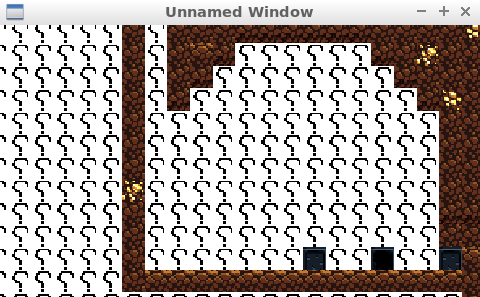
Apply a 1 pixel correction in the packer sources, recompile it, repack tiles, and…

no_seams

Resources

More information on filtering:
https://www.khronos.org/opengl/wiki/Sampler_Object#Filtering

Pixel bleeding case, but when using linear filtering:
https://gamedev.stackexchange.com/questions/46963/how-to-avoid-texture-bleeding-in-a-texture-atlas
If I was to write non-pixel-art renderer and utilize linear filtering, and half-pixel-correction would not work, I would fight pixel-bleeding by scaling tiles up on output (feature offered by atlasc), and, when normalizing coordinates, move UV’s by one pixel inwards the tile.
Some very little parts of the image would be lost, but the damage would be minimized by scaling.

The offbeat art of Android live wallpapers

Whether as a mean of utilitarism or pure visual amusement, for a long time live wallpapers felt for me like a niche, stigmatized as battery-draining, or just a triviality that is obscured by the fact that there’s no one I know personally who uses them.

Only recently, stumbling upon this pure diamond I found on Github:

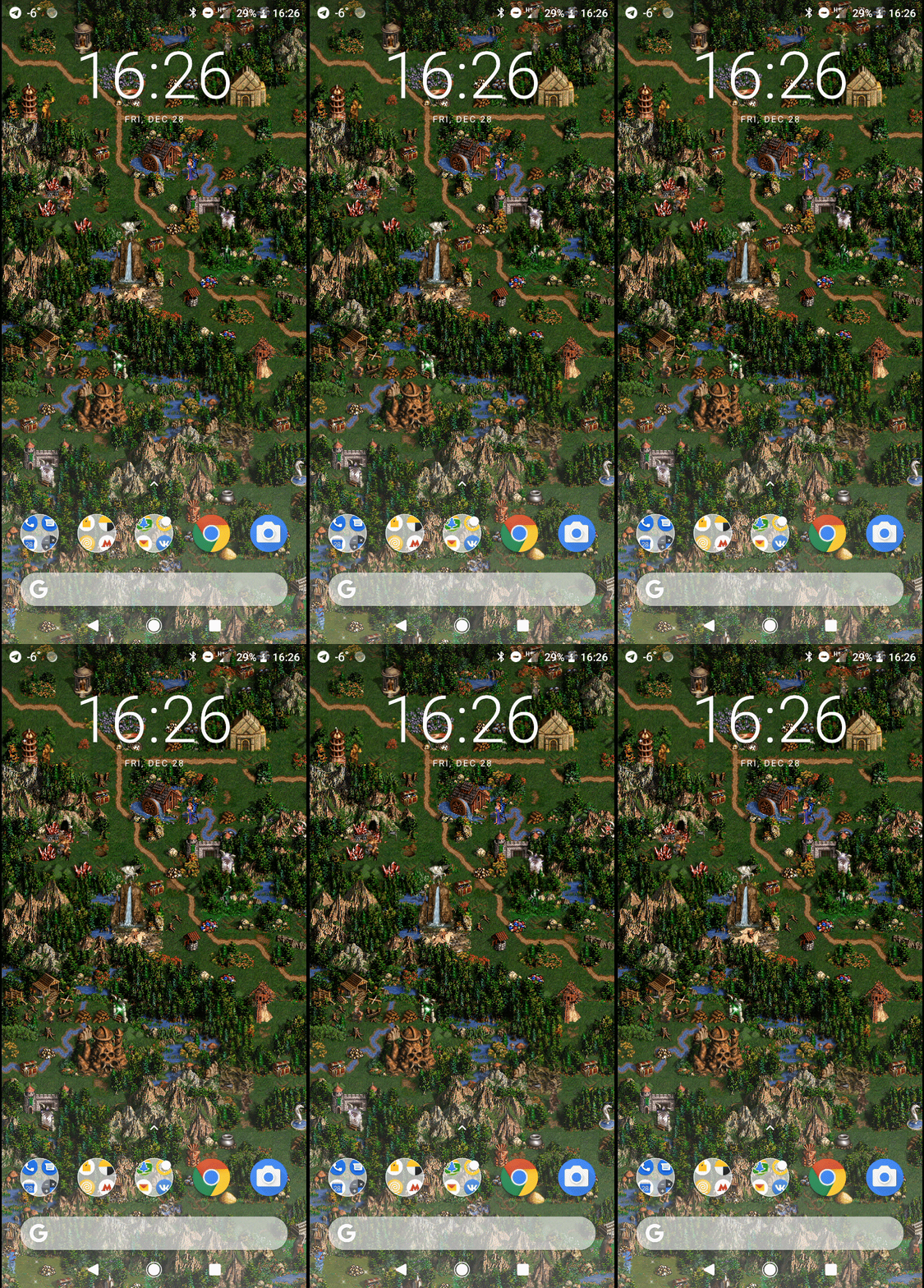
h3liveHOMM 3 themed live wallpaper by Ilya Pomaskin. I recommend building from included gradle files, as it worked fine for me.
https://github.com/IlyaPomaskin/h3lwp

…and refreshing my memories of playing H3:WOG for hours I asked myself a few questions, including:

  • How exactly do you develop one?
  • What did people already accomplish, in the means of creativity on this field?

Well, the first answer can be handed right away.

It boils down to creating an application that:

  • Runs always, even when in background – achieved by creating a Service
  • Does not create a window on its own, draws on existing surface supplied by the system – achieved by creating a Service, that extends specifically WallpaperService.

Only thing you need to do is to provide implementation for a few methods (i.e runonTouchEvent, onVisibilityChanged) of Android SDK’s abstract classes WallpaperService and WallpaperService.Engine, and update your manifest file.

This can be done in any tool of your choice, as whether you’re developing in Unity, LibGDX or Android Studio, when deploying to Android you can always override default manifest file and provide additional java files.

Actually, it is that simple that I created a repository where I placed template files for live wallpapers using mentioned technologies:

https://github.com/dbeef/CreatingAndroidLiveWallpapers

You can clone it and create your live wallpaper right away.
I covered creating those templates in a series of three separate blog posts:

Once you install such application, it will be visible on your device’s wallpaper browser.

Coming into my second question – If it’s easily accessible, then there must be tons of live wallpapers, for which creativity didn’t simply end on:

Let’s take an image, split it into layers, and add the parallax efect!

And it is correct. There’s a wallpaper that takes a GLSL shader on input and uses it as an output. Another one is an iteration of classic 1970 John Conway’s Game of life. The one after draws Conky-like utility information (RAM, CPU, network usage), yet another opens random Wikipedia article (I would fancy one, that would open CPP-reference, though).

shaderEditorWallpaper
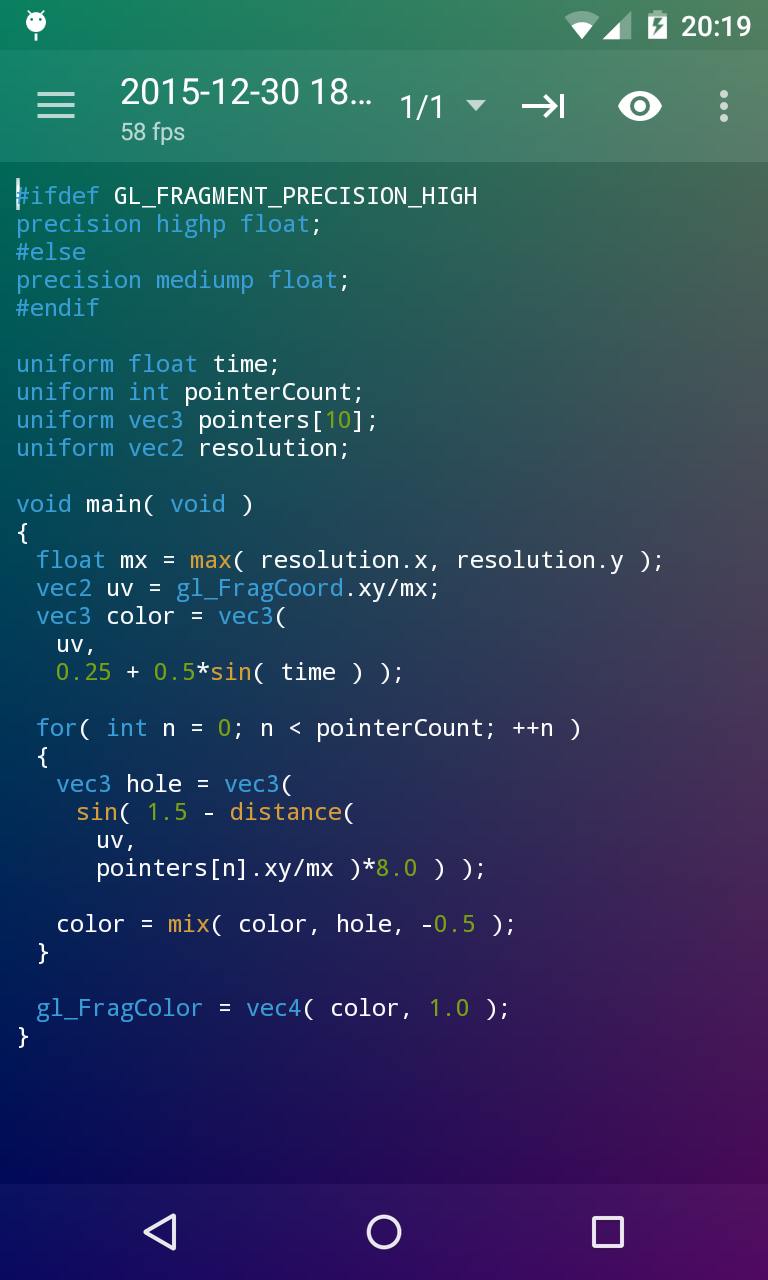
ShaderEditor – Allows to input GLSL shader and use it as live wallpaper. https://github.com/markusfisch/ShaderEditor
bouncingDvdDVDLiveWallpaper – Just what you see.
https://github.com/PHELAT/DVDLiveWallpaper

Seemingly, making one’s wallpaper is part of self-expression, like wearing that blue shirt with name of a band you like, or customization, that people tend to make when buying smartphone cases.

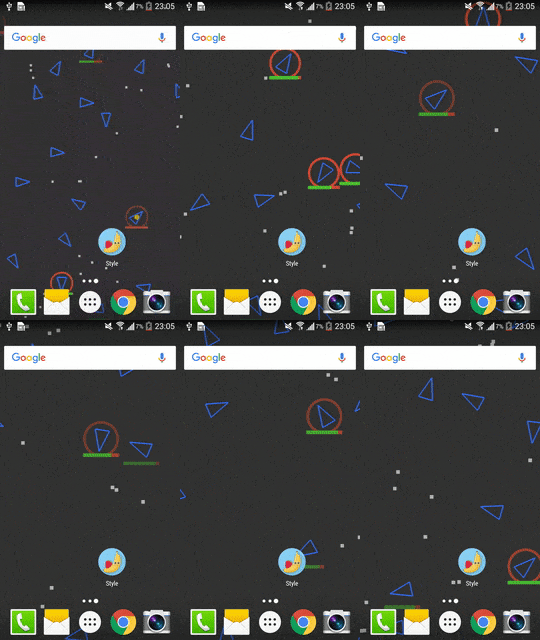
FlowersSpaceBattleBe careful, there’s a space battle going on!
https://github.com/jinkg/Style

I offer no conclusion other, than it is a satisfying weekend project to do, when your current project extends to many months and pulls you down.

Creating live wallpaper in Unity

This post is part of my series on Android live wallpapers.
Visit my other blog posts where I cover creating live wallpapers in:

Templates for all three technologies are on my repository:
https://github.com/dbeef/CreatingAndroidLiveWallpapers


After covering live wallpapers in Android Studio (which I recommend to see, for the sake of having reference to the concepts I will use in this post) I had some understanding of what I want to do in Unity, which was:

  • Overriding default AndroidManifest.xml that Unity creates
  • Add one custom Java class, that I will reference from overriden manifest
  • Add another resource xml file

Additionally, as Unity creates its own Activity when exporting as Android Project, I wanted to reference that activity from my Service declared in Java class, so I could render Unity scene when running as wallpaper.

So I created a clean new Unity project and set-up building to Android.

After quick Googling it looked adding my custom Android-specific code to Unity project will be essentially… Creating Assets/Plugins/Android directory (from root of the project) and copying my files there.

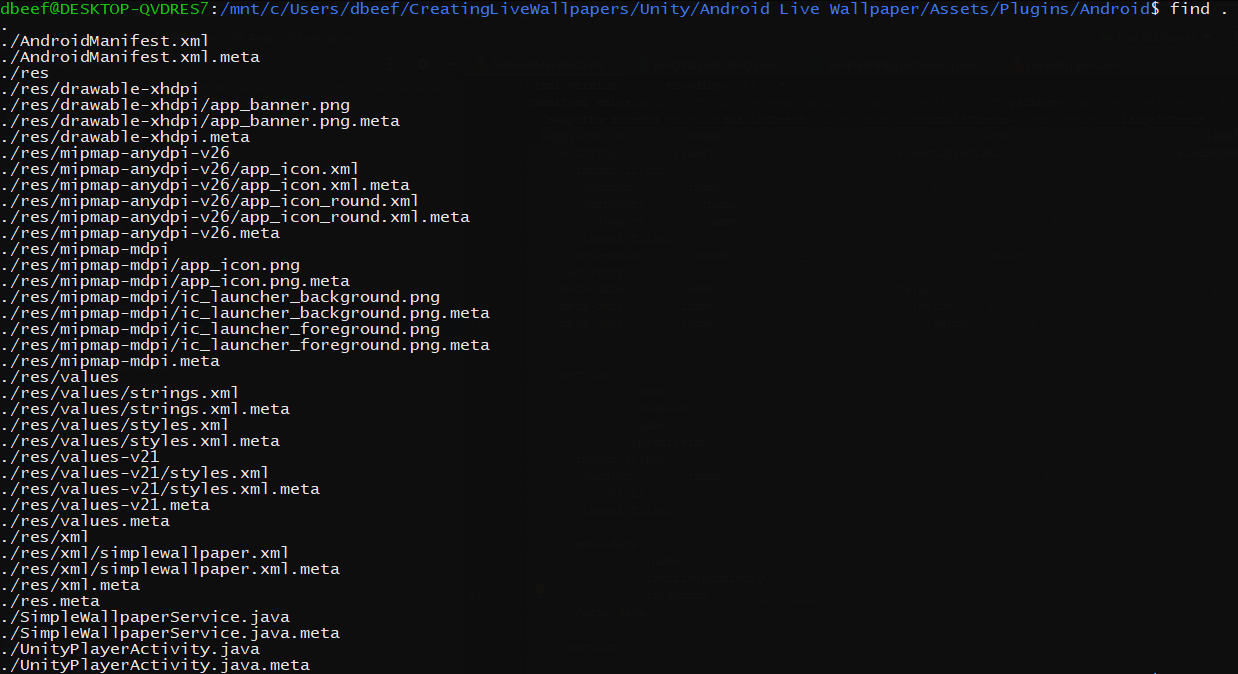
When listing files from that directory:

listing_unity

So what I did was copying res, *.java files from of my Android Studio project, omitting SimpleWallpaperActivity.java, as Unity provides its own Activity.

I also omitted AndroidManifest.xml file – as the one provided by Unity (when exporting as Android project) was a bit bloated and it would be more efficient to just copy very specific content that I needed into Unity’s – I copied whole service tag from my Android Studio project and uses-feature tag.

What was still needed at this point is to reference Unity’s activity to render the scene.
As normally I don’t use Unity I gave up after some time and found out existing wallpaper service that utilizes Unity’s activity by PavelDoGreat:

https://github.com/PavelDoGreat/Unity-Android-Live-Wallpaper/blob/master/WallpaperActivity.java

Keeping package name consistent within Unity and overriden classes that I supplied was essential, otherwise some symbols can be undefined.

You can set package name in Unity’s:
Edit -> Project Settings -> Player.

What then? Just hit Unity’s Build and run.

Creating live wallpaper in LibGDX

This post is part of my series on Android live wallpapers.
Visit my other blog posts where I cover creating live wallpapers in:

Templates for all three technologies are on my repository:
https://github.com/dbeef/CreatingAndroidLiveWallpapers


Creating a live wallpaper in LibGDX is only a step further from creating one with Android Studio’s no-activity template (I suggest having a look at my post covering it, as I will mention concepts that I explain there).

There’s a service, but it does not extend directly from WallpaperService – it does from LibGDX’s AndroidLiveWallpaperService, that in fact goes from WallpaperService.

There’s no simple Activity that extends from Activity – there’s one that extends from AndroidApplication.

There’s AndroidManifest.xml with the very same changes as in case of Android Studio project, and drawing happens in LibGDX’s core project (as LibGDX is multi-platform it generates android/ios/core/desktop/html projects, where core shares common part and other are mostly stubs for launching on specific platform).